Where to find it
In Online Store → Themes, open the unpublished theme editor, choose a compatible template, then Add section → Advantages. Availability follows the selected template and section group.
This section is not available in the Header group, the Overlay group.
Set it up
- Set the section Heading and Text, then add an Advantage block for each benefit.
- In each block, choose Visual. Select the corresponding icon or image, or supply the Number; write its Heading and supporting Text.
- Add Link label and Link where the benefit needs a destination. Highlight card can distinguish one selected item.
- Choose Grid, Featured first or Carousel, then set desktop, tablet and mobile columns. Select the mobile presentation separately.
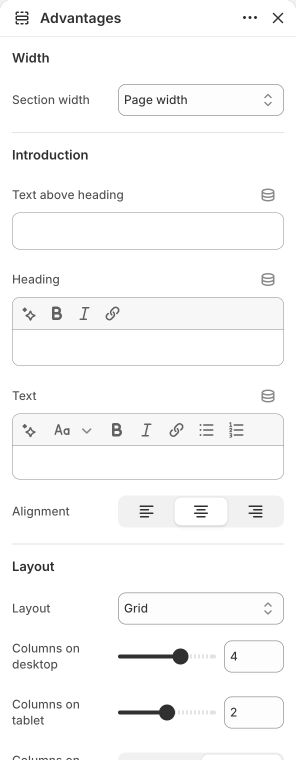
Main settings to review
| Setting | Choices or control |
|---|---|
| Layout | Grid · Featured first · Carousel |
| Columns on desktop | 2–5; step 1 |
| Mobile layout | Stack · Horizontal scroll |
| Card style | Plain · Border · Surface |
| Icon or image size | 40–160 px; step 4 |
Blocks and content
This section allows up to 8 direct blocks. Nested blocks have their own parent-specific choices and limits.
- Advantage: configure this inside the section. Its available controls are listed below.
Content and media
- Use simple, consistently sized icons or square images. For image cards, start with an approximately 800 px square original; this is a recommendation, not an upload requirement.
- Use numbers and proof labels only when they describe your actual business.
Check the mobile layout
- Mobile layout offers Stack and Horizontal scroll. Check every benefit remains reachable and its text does not require desktop hover.
Common questions and fixes
- A card has no visual: verify its Visual selection and the matching image, icon or number.
- A link is missing: supply both its label and destination.
Full control reference
Names, choices, ranges and defaults below are read from this version of the theme. Defaults are starting examples, not promises about your business. Some controls appear only for the matching layout. Block contents and preset starting values can differ from the base defaults.
All section controls (31)
| Setting | Control or choices | Default and guidance |
|---|---|---|
| Width / Section width | Page width · Full width · Custom width | Default: Page width. |
| Width / Custom width | 50–100 %; step 5 | Default: 80. Percentage of screen width. This control appears only when the relevant layout or related option is selected. |
| Introduction / Text above heading | Text | Default: WHY CHOOSE US. |
| Introduction / Heading | Formatted inline text | Default: Thoughtful by design. |
| Introduction / Text | Formatted text | Default: Pair every promise with a clear reason to believe.. |
| Introduction / Alignment | Left / Center / Right | Default: center. |
| Layout / Layout | Grid · Featured first · Carousel | Default: Grid. |
| Layout / Columns on desktop | 2–5; step 1 | Default: 4. This control appears only when the relevant layout or related option is selected. |
| Layout / Columns on tablet | 1–3; step 1 | Default: 2. This control appears only when the relevant layout or related option is selected. |
| Layout / Columns on mobile | 1 · 2 | Default: 1. |
| Layout / Mobile layout | Stack · Horizontal scroll | Default: Horizontal scroll. This control appears only when the relevant layout or related option is selected. |
| Layout / Desktop gap | 0–48 px; step 4 | Default: 16. |
| Layout / Mobile gap | 0–32 px; step 2 | Default: 12. |
| Media / Section background image | Choose an image | Default: Not set. |
| Media / Section background position | Image focal point · Top · Center · Bottom | Default: Image focal point. This control appears only when the relevant layout or related option is selected. |
| Media / Section background behavior | Scroll with section · Fixed to viewport | Default: Scroll with section. This control appears only when the relevant layout or related option is selected. |
| Media / Section background overlay | 0–80 %; step 5 | Default: 0. This control appears only when the relevant layout or related option is selected. |
| Cards / Card style | Plain · Border · Surface | Default: Surface. |
| Cards / Content alignment | Left / Center / Right | Default: left. |
| Cards / Icon or image size | 40–160 px; step 4 | Default: 64. |
| Cards / Card padding | 12–64 px; step 4 | Default: 28. |
| Cards / Corner radius | 0–32 px; step 2 | Default: 8. |
| Style / Color scheme | Choose a color scheme | Default: background. |
| Style / Top padding | 0–160 px; step 4 | Default: 64. |
| Style / Bottom padding | 0–160 px; step 4 | Default: 64. |
| Style / Mobile padding top | 0–120 px; step 4 | Default: 40. |
| Style / Mobile padding bottom | 0–120 px; step 4 | Default: 40. |
| Style / Custom CSS class | Text | Default: Not set. Enter class names only, without a period. |
| Advanced / Hide on desktop | On / Off | Default: Off. This control appears only when the relevant layout or related option is selected. |
| Advanced / Hide on mobile | On / Off | Default: Off. This control appears only when the relevant layout or related option is selected. |
| Advanced / Section anchor | Text | Default: Not set. Optional. Use a unique name for links that jump to this section. |
Advantage block controls (11)
| Setting | Control or choices | Default and guidance |
|---|---|---|
| Visual | Icon · Image · Number · None | Default: Icon. |
| Icon | Shield · Diamond · Leaf · Delivery · Returns · Handmade · Check · Star | Default: Shield. This control appears only when the relevant layout or related option is selected. |
| Image | Choose an image | Default: Not set. This control appears only when the relevant layout or related option is selected. |
| Alt text | Text | Default: Not set. This control appears only when the relevant layout or related option is selected. |
| Number | Text | Default: 01. This control appears only when the relevant layout or related option is selected. |
| Proof label | Text | Default: OUR PROMISE. |
| Heading | Formatted inline text | Default: Made to last. |
| Text | Formatted text | Default: Explain the concrete standard, service, or evidence behind this advantage.. |
| Link label | Text | Default: Not set. |
| Link | Choose or enter a link | Default: Not set. |
| Highlight card | On / Off | Default: Off. |