Where to find it
In Online Store → Themes, open the unpublished theme editor, choose a compatible template, then Add section → Featured product. Availability follows the selected template and section group.
This section is not available in the Header group, the Footer group.
Set it up
- For a product page, select the Products template and a real preview product. For an addable Featured product, choose Featured product in the section settings.
- Arrange information blocks in the intended order: Title, Price, Variant picker, Quantity and add to cart or Buy buttons, followed by supporting details.
- Choose Gallery style, Image aspect ratio and Default image fit. Theme default inherits the corresponding Theme settings value.
- Add Description, Collapsible row, More information, Line item property or other supported blocks only where they have useful content. Connect dynamic content where the editor supports it.
- Configure sticky add-to-cart behavior if needed. Review the separate multi-variant option rather than assuming a single-variant purchase flow suits every product.
- Preview variant changes, quantity rules, sold-out/unavailable combinations, cart updates and product media before using the template for multiple products.
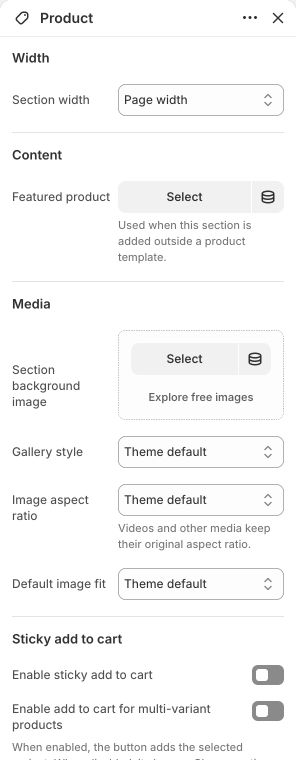
Main settings to review
| Setting | Choices or control |
|---|---|
| Featured product | Choose a product |
| Gallery style | Theme default · Slideshow · Scroll one column · Scroll two columns |
| Image aspect ratio | Theme default · Adapt to image · Square (1:1) · Portrait (4:5) · Landscape (3:2) |
| Default image fit | Theme default · Cover · Contain |
| Enable sticky add to cart | On / Off |
| Enable add to cart for multi-variant products | On / Off |
Blocks and content
- Vendor — up to 1: configure this inside the section. This block has no independent content settings.
- Title — up to 1: configure this inside the section. This block has no independent content settings.
- Price — up to 1: configure this inside the section. Its available controls are listed below.
- SKU — up to 1: configure this inside the section. This block has no independent content settings.
- Inventory status — up to 1: configure this inside the section. Its available controls are listed below.
- Variant picker — up to 1: configure this inside the section. Its available controls are listed below.
- Quantity and add to cart — up to 1: configure this inside the section. Its available controls are listed below.
- Buy buttons — up to 1: configure this inside the section. This block has no independent content settings.
- Description — up to 1: configure this inside the section. This block has no independent content settings.
- Badges: configure this inside the section. Its available controls are listed below.
- Rating — up to 1: configure this inside the section. This block has no independent content settings.
- Separator: configure this inside the section. This block has no independent content settings.
- Line item property: configure this inside the section. Its available controls are listed below.
- Volume pricing table — up to 1: configure this inside the section. Its available controls are listed below.
- Pickup availability — up to 1: configure this inside the section. This block has no independent content settings.
- Offers: configure this inside the section. Its available controls are listed below.
- Text: configure this inside the section. Its available controls are listed below.
- Image: configure this inside the section. Its available controls are listed below.
- Button: configure this inside the section. Its available controls are listed below.
- More information: configure this inside the section. Its available controls are listed below.
- Modal: configure this inside the section. Its available controls are listed below.
- Custom Liquid: configure this inside the section. Its available controls are listed below.
- Icon with text: configure this inside the section. Its available controls are listed below.
- Social share: configure this inside the section. Its available controls are listed below.
- Collapsible row: configure this inside the section. Its available controls are listed below.
App content requires a compatible installed app. Its setup and support come from that app; the theme does not supply the app service.
Content and media
- Product media belongs to the product in Shopify. Use consistent, sharp originals; square 1600–2000 px images are a useful starting point when using a square gallery.
- Choose Contain to preserve a full object silhouette or Cover for an intentionally filled crop. Video and 3D output also depends on media actually assigned to the product.
- Rating and volume-pricing blocks need corresponding real product data or eligibility; adding a display block does not create reviews, inventory or pricing rules.
- For 3D and AR, assign a model in Shopify and wait for processing to finish. Select its 3D thumbnail to display the web viewer and the available View in your space control.
- Supported iPhone and iPad use a native Apple Quick Look link when the browser supports AR and the model has a processed USDZ source. Otherwise, the theme retains the ShopifyXR path used on other eligible devices; its control still depends on device and model eligibility.
- Before launch, test web rotation and pinch zoom, opening the system viewer, placing the model in your surroundings, and returning to switch media and scroll the page on a real supported phone or tablet. A desktop preview does not verify AR.
- Unit pricing comes from the product variant measurement configured in Shopify. Check the selected variant, its unit price and the corresponding cart line together.
- Optional hosted-video captions: create the Orveta video captions metaobject definition and a product Video captions list reference using orveta.video_captions. Select the exact video already used in the product gallery, add up to two direct HTTPS WebVTT URLs with matching language codes and optional labels, then select that entry on the product. Use one entry per video and at most 50 entries per product. Product, Featured product and Quick view share these entries; section/block Video captions are configured in their own editor controls.
- The complete one-time field table and entry setup are in Build product pages and product sections → Optional hosted video captions.
Check the mobile layout
- Review the main image, thumbnail strip and variant controls together. Test the longest product title and option names, including names without spaces, for wrapping inside the page. Test vertical page scrolling over media as well as horizontal media navigation, and check sticky controls do not cover purchasing details.
Common questions and fixes
- Featured product is blank: select an available product; the main product template instead receives its product from the current product page.
- Collapsible content is empty: select its page/content source, or use Hide block if no dynamic content where appropriate.
- A purchase cannot proceed: check required line-item properties, the chosen variant, quantity rules and availability.
- The same layout changes several products: they share this template; create and assign a separate template for a different layout.
- View in your space is absent: select the 3D thumbnail, confirm the model has finished processing in Shopify, and test a supported device. The native iPhone/iPad entry also needs a USDZ source. The control remains hidden when the device or required source is unsupported.
- An AR control appears but does not open the system viewer: open the storefront directly in a supported browser, reload, and tap once without swiping. Use Safari for iPhone/iPad testing rather than an in-app browser. If it still fails, contact support with the device, OS and browser versions and product URL. Web rotation and zoom alone do not confirm AR launch.
- Subscription choices require a compatible purchase-option app and an app block inside the product section. The theme does not create selling plans.
- Captions attach to the selected video file, not its position or title. Replacing a video requires updating its caption entry. Ensure metaobject storefront access and product-metafield storefront access are enabled; incomplete tracks are omitted and the first matching entry wins. YouTube/Vimeo keep their provider captions.
Full control reference
Names, choices, ranges and defaults below are read from this version of the theme. Defaults are starting examples, not promises about your business. Some controls appear only for the matching layout. Block contents and preset starting values can differ from the base defaults.
All section controls (19)
| Setting | Control or choices | Default and guidance |
|---|---|---|
| Width / Section width | Page width · Full width · Custom width | Default: Page width. |
| Width / Custom width | 50–100 %; step 5 | Default: 80. Percentage of screen width. This control appears only when the relevant layout or related option is selected. |
| Content / Featured product | Choose a product | Default: Not set. Used when this section is added outside a product template. |
| Media / Section background image | Choose an image | Default: Not set. |
| Media / Section background position | Image focal point · Top · Center · Bottom | Default: Image focal point. This control appears only when the relevant layout or related option is selected. |
| Media / Section background behavior | Scroll with section · Fixed to viewport | Default: Scroll with section. This control appears only when the relevant layout or related option is selected. |
| Media / Section background overlay | 0–80 %; step 5 | Default: 0. This control appears only when the relevant layout or related option is selected. |
| Media / Gallery style | Theme default · Slideshow · Scroll one column · Scroll two columns | Default: Theme default. |
| Media / Image aspect ratio | Theme default · Adapt to image · Square (1:1) · Portrait (4:5) · Landscape (3:2) | Default: Theme default. Videos and other media keep their original aspect ratio. |
| Media / Default image fit | Theme default · Cover · Contain | Default: Theme default. |
| Sticky add to cart / Enable sticky add to cart | On / Off | Default: Off. |
| Sticky add to cart / Enable add to cart for multi-variant products | On / Off | Default: Off. When enabled, the button adds the selected variant. When disabled, it shows a Choose options button. |
| Sticky add to cart / Style | Wide · Floating | Default: Wide. |
| Sticky add to cart / Background color | Choose a color | Default: #FFFFFF. |
| Sticky add to cart / Text color | Choose a color | Default: #111111. |
| Sticky add to cart / Blur background | On / Off | Default: Off. |
| Advanced / Hide on desktop | On / Off | Default: Off. This control appears only when the relevant layout or related option is selected. |
| Advanced / Hide on mobile | On / Off | Default: Off. This control appears only when the relevant layout or related option is selected. |
| Advanced / Section anchor | Text | Default: Not set. Optional. Use a unique name for links that jump to this section. |
Price block controls (1)
| Setting | Control or choices | Default and guidance |
|---|---|---|
| Price size | 16–36 px; step 1 | Default: 32. |
Inventory status block controls (2)
| Setting | Control or choices | Default and guidance |
|---|---|---|
| Low stock threshold | 1–20; step 1 | Default: 5. |
| Show inventory quantity | On / Off | Default: Off. |
Variant picker block controls (1)
| Setting | Control or choices | Default and guidance |
|---|---|---|
| Picker style | Theme default · Buttons · Dropdowns | Default: Theme default. |
Quantity and add to cart block controls (1)
| Setting | Control or choices | Default and guidance |
|---|---|---|
| Add to cart background color | Choose a color | Default: Not set. |
Badges block controls (4)
| Setting | Control or choices | Default and guidance |
|---|---|---|
| Badge text | Text | Default: Not set. |
| Show sale badge | On / Off | Default: On. |
| Background color | Choose a color | Default: #111111. |
| Text color | Choose a color | Default: #FFFFFF. |
Line item property block controls (6)
| Setting | Control or choices | Default and guidance |
|---|---|---|
| Label | Text | Default: Personalization. |
| Input type | Single-line text · Multi-line text · Select · Checkbox | Default: Single-line text. |
| Placeholder | Text | Default: Not set. |
| Options | Multiline text | Default: Not set. Enter one option per line. Used when input type is Select. |
| Checkbox value | Text | Default: Not set. |
| Required | On / Off | Default: Off. |
Volume pricing table block controls (1)
| Setting | Control or choices | Default and guidance |
|---|---|---|
| Heading | Text | Default: Volume pricing. |
Offers block controls (1)
| Setting | Control or choices | Default and guidance |
|---|---|---|
| Content | Formatted text | Default: Free shipping on orders over $100.. |
Text block controls (4)
| Setting | Control or choices | Default and guidance |
|---|---|---|
| Text | Formatted text | Default: Text. |
| Text size | Small · Normal · Large | Default: Normal. |
| Text color | Choose a color | Default: Not set. |
| Text transform (uppercase) | On / Off | Default: Off. |
Image block controls (3)
| Setting | Control or choices | Default and guidance |
|---|---|---|
| Image | Choose an image | Default: Not set. |
| Image alt text | Text | Default: Not set. |
| Link | Choose or enter a link | Default: Not set. |
Button block controls (3)
| Setting | Control or choices | Default and guidance |
|---|---|---|
| Button label | Text | Default: Learn more. |
| Button link | Choose or enter a link | Default: Not set. |
| Style | Primary · Secondary | Default: Primary. |
More information block controls (2)
| Setting | Control or choices | Default and guidance |
|---|---|---|
| Heading | Text | Default: More information. |
| Page content | Choose a page | Default: Not set. |
Modal block controls (3)
| Setting | Control or choices | Default and guidance |
|---|---|---|
| Button label | Text | Default: Size guide. |
| Heading | Text | Default: Not set. |
| Content | Formatted text | Default: Not set. |
Custom Liquid block controls (1)
| Setting | Control or choices | Default and guidance |
|---|---|---|
| Custom Liquid | Custom Liquid | Default: Not set. Add supported Liquid or HTML. |
Icon with text block controls (9)
| Setting | Control or choices | Default and guidance |
|---|---|---|
| Icon source | Icon · Image | Default: Icon. |
| Icon | Support · Box · Gift · Heart · Leaf · Ruler · Shield · Shirt · Shoe · Star · Tag · Tags · Time · Trophy · Truck · Users · Wallet · Wash · Watch · Wrench | Default: Support. |
| Custom SVG icon | Multiline text | Default: Not set. Optional. Paste trusted SVG markup to replace the selected icon. |
| Image | Choose an image | Default: Not set. |
| Image alt text | Text | Default: Not set. |
| Heading | Formatted inline text | Default: Not set. |
| Heading size | 16–48 px; step 1 | Default: 22. |
| Description | Formatted text | Default: Not set. |
| Icon and text layout | Icon beside text, left aligned · Icon above text, left aligned · Icon above text, centered · Icon above text, right aligned | Default: Icon beside text, left aligned. |
Social share block controls (13)
| Setting | Control or choices | Default and guidance |
|---|---|---|
| Title | Text | Default: Not set. |
| Subheading | Text | Default: Not set. |
| Prompt text | Text | Default: Not set. |
| Icon | Choose an image | Default: Not set. |
| Show Facebook | On / Off | Default: On. |
| Show X (Twitter) | On / Off | Default: On. |
| Show Pinterest | On / Off | Default: On. |
| Show WhatsApp | On / Off | Default: Off. |
| Show email | On / Off | Default: Off. |
| Show share link | On / Off | Default: On. Uses the native sharing options supported by the visitor's browser. |
| Collapsible | On / Off | Default: Off. |
| Layout | Boxed · Compact | Default: Compact. |
| Text color | Choose a color | Default: Not set. |
Collapsible row block controls (12)
| Setting | Control or choices | Default and guidance |
|---|---|---|
| Block heading / Heading | Text | Default: Product information. |
| Block heading / Subheading | Text | Default: Not set. |
| Block heading / Prompt text | Text | Default: Not set. |
| Block heading / Icon | Choose an image | Default: Not set. |
| Block content / Content | Formatted text | Default: Not set. |
| Block content / Page content | Choose a page | Default: Not set. |
| Block content / Content image | Choose an image | Default: Not set. |
| Dynamic content / Hide block if no dynamic content | On / Off | Default: Off. Hides this block when no Page content or content image is available. |
| Block style / Collapsible | On / Off | Default: On. |
| Block style / Open by default | On / Off | Default: Off. |
| Block style / Layout | Boxed · Compact | Default: Compact. |
| Block style / Text color | Choose a color | Default: Not set. |