Where to find it
Open Overlay group → Quick view. This controls the shared quick-add/quick-view interface rather than a section placed in the page body.
Set it up
- Choose whether Color and Size options should display in Quick Add.
- Set Quick View heading and Quick Add button label.
- Replace Quick Add return policy with your actual policy text; the example is not a service commitment for your store.
- Review Product cards add-to-cart settings and Product quick-view quantity settings in Theme settings.
- Open Quick view from a real product card and test media, variants, quantity, closing and cart updates.
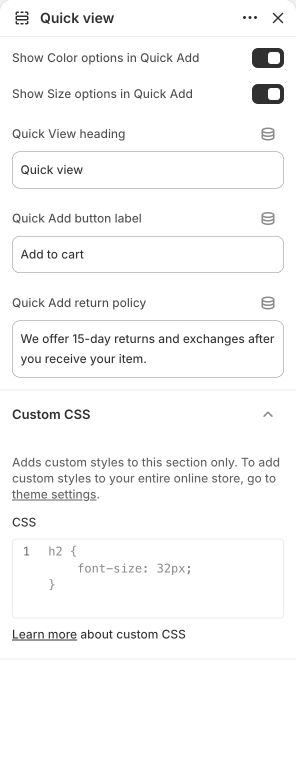
Main settings to review
| Setting | Choices or control |
|---|---|
| Show Color options in Quick Add | On / Off |
| Show Size options in Quick Add | On / Off |
| Quick View heading | Text |
| Quick Add button label | Text |
| Quick Add return policy | Text |
Content and media
- The dialog uses actual product media. There is no separate promotion-image upload in these Quick view settings.
Check the mobile layout
- Check the dialog's image area, options, close button and purchase action on a phone. It should remain usable above other fixed controls.
Common questions and fixes
- No Quick view action is offered: review the Product cards add-to-cart style and the actual product's availability/options.
- A policy message is wrong: edit Quick Add return policy rather than the main product description.
Full control reference
Names, choices, ranges and defaults below are read from this version of the theme. Defaults are starting examples, not promises about your business. Some controls appear only for the matching layout. Block contents and preset starting values can differ from the base defaults.
All section controls (5)
| Setting | Control or choices | Default and guidance |
|---|---|---|
| Show Color options in Quick Add | On / Off | Default: On. |
| Show Size options in Quick Add | On / Off | Default: On. |
| Quick View heading | Text | Default: Quick view. |
| Quick Add button label | Text | Default: Add to cart. |
| Quick Add return policy | Text | Default: We offer 15-day returns and exchanges after you receive your item.. |