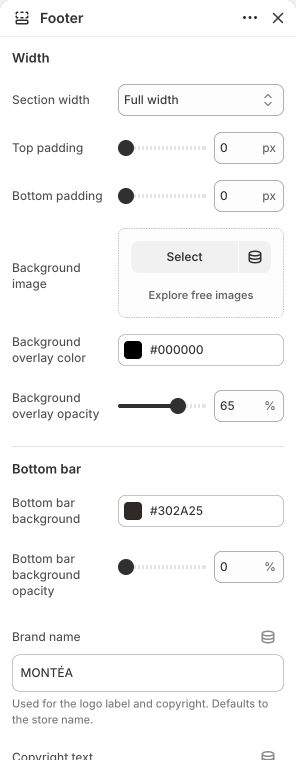
Build the shared brand, menu, newsletter, social and lower-footer area with native blocks.
Where to find it
Open Footer group → Footer. Its blocks are shared across the normal storefront layout; the password page has its own presentation.
Set it up
Add a Brand block and choose its logo, size and description. Set Brand name when a text fallback is useful.
Add Footer menu blocks and select actual Shopify menus. Set each heading and its mobile open/closed state.
Add Newsletter where wanted and write its heading, copy and button label. Review the signup success/error states separately from campaign delivery. If the page has other signup forms, include the Footer form in your checks.
Add Social media and choose Brand column bottom or Newsletter column bottom. Profile URLs come from Theme settings → Social media; choose official or custom icon colors here.
Optionally add Follow on Shop and choose its placement. Actual availability depends on Shopify's eligibility conditions.
Review copyright, payment icons, country selector, background and padding against the real store setup.
Footer. Actual controls in the unpublished Demo; the screenshot illustrates their location and current example values, not every setting or a required design. Open the image for a larger view.
Main settings to review
Setting
Choices or control
Brand name
Text
Copyright text
Text
Background image
Choose an image
Show country selector
On / Off
Show payment icons
On / Off
Bottom padding
0–160 px; step 4
Blocks and content
Brand — up to 1: configure this inside the section. Its available controls are listed below.
Footer menu — up to 3: configure this inside the section. Its available controls are listed below.
Newsletter — up to 1: configure this inside the section. Its available controls are listed below.
Social media — up to 1: configure this inside the section. Its available controls are listed below.
Follow on Shop — up to 1: configure this inside the section. Its available controls are listed below.
Content and media
Use a sharp logo with appropriate clear space. A background image is optional; adjust its overlay so menus and signup remain readable.
Payment icons reflect the store's available payment setup; a theme display setting does not activate a provider.
Check the mobile layout
Check menu accordion states, newsletter feedback and copyright clearance above fixed bottom navigation. The Footer country selector is hidden on mobile; the mobile menu provides its localization control.
Common questions and fixes
Social icons are missing: enter their global profile URLs and add the Social media block.
Follow on Shop does not render: check the store's eligibility, not only the block placement.
A menu is empty: select a real menu and confirm its destinations are published.
Full control reference
Names, choices, ranges and defaults below are read from this version of the theme. Defaults are starting examples, not promises about your business. Some controls appear only for the matching layout. Block contents and preset starting values can differ from the base defaults.
All section controls (13)
Setting
Control or choices
Default and guidance
Width / Section width
Page width · Full width · Custom width
Default: Page width.
Width / Custom width
50–100 %; step 5
Default: 90. Percentage of screen width. This control appears only when the relevant layout or related option is selected.
Width / Top padding
0–160 px; step 4
Default: 24.
Width / Bottom padding
0–160 px; step 4
Default: 24.
Width / Background image
Choose an image
Default: Not set.
Width / Background overlay color
Choose a color
Default: #000000.
Width / Background overlay opacity
0–90 %; step 5
Default: 65.
Bottom bar / Bottom bar background
Choose a color
Default: #181818.
Bottom bar / Bottom bar background opacity
0–100 %; step 5
Default: 80.
Bottom bar / Brand name
Text
Default: Not set. Used for the logo label and copyright. Defaults to the store name.
Bottom bar / Copyright text
Text
Default: All rights reserved..
Bottom bar / Show country selector
On / Off
Default: On.
Bottom bar / Show payment icons
On / Off
Default: On.
Brand block controls (3)
Setting
Control or choices
Default and guidance
Logo
Choose an image
Default: Not set. Uses the theme logo when empty.
Logo size
40–220 px; step 4
Default: 200.
Description
Multiline text
Default: Thoughtful pieces for everyday living..
Footer menu block controls (3)
Setting
Control or choices
Default and guidance
Heading
Text
Default: Information.
Menu
Choose a menu
Default: footer.
Mobile menu state
Open · Closed
Default: Open.
Newsletter block controls (3)
Setting
Control or choices
Default and guidance
Heading
Text
Default: Stay in the loop.
Text
Multiline text
Default: Subscribe for updates and exclusive offers..
Button label
Text
Default: Subscribe.
Social media block controls (4)
Setting
Control or choices
Default and guidance
Social media position
Brand column bottom · Newsletter column bottom
Default: Brand column bottom.
Icon colors
Official brand colors · Custom colors
Default: Official brand colors.
Custom icon color
Choose a color
Default: #ffffff. This control appears only when the relevant layout or related option is selected.
Custom icon background
Choose a color
Default: #181818. This control appears only when the relevant layout or related option is selected.